June 21, 2026
·
13 min read
How Google Search Console Works: Crawling to Performance Reports
A pillar guide to how Google Search Console works end to end—from crawl discovery to reporting—mapping the data pipeline, property/permission setup, crawling and rendering behavior, canonicalization and indexing decisions, and how to interpret Coverage/Indexing plus links reports when numbers don’t match.

If you’ve ever compared Search Console to your analytics or rank tracker and wondered why the numbers don’t line up, you’re not alone. GSC is reporting what Google saw and processed—not just what users did—and that difference changes how you debug SEO issues.
This guide walks you through the full pipeline: how Google discovers URLs, schedules crawls, fetches and renders pages, chooses canonicals, and decides what makes it into the index. You’ll also learn what sitemaps and URL Inspection really do, and how to use Coverage/Indexing and Links reports to prioritize fixes.
Big Picture Pipeline
Google Search Console is a dashboard, not the engine. It reflects what Google discovered, decided to index, served, and later aggregated into reports. That separation is why GSC feels “behind” what happened minutes ago.
Systems involved
GSC sits on top of multiple Google systems, each with its own timing and rules. You’re seeing a stitched view across crawling, indexing, serving, and reporting layers.
Search and indexing systems decide what exists and what’s eligible to rank. Reporting systems summarize what was served and clicked, then publish it into GSC.
Treat GSC like an observatory with several telescopes, not one master database.
Data life cycle
A single URL’s “journey” crosses several queues before it becomes a chart in GSC.
- Discovery: Google finds a URL via links, sitemaps, or redirects.
- Fetch and render: Googlebot requests content, then may render JavaScript.
- Index selection: Google picks a canonical and decides index eligibility.
- Serving and logging: Search results are shown, then queries and clicks are logged.
- Aggregation and publishing: Logs are processed, filtered, and released into reports.
When you troubleshoot, ask where the pipeline broke, not which report is wrong.
Why numbers differ
GSC and analytics answer different questions, so their counts rarely match. One measures Google Search interactions; the other measures on-site activity after a page loads.
Differences come from aggregation choices, privacy thresholds, canonicalization rules, and delayed joins across systems. Even a simple change, like a new canonical, can shift which URL gets credit.
When the gap matters, align definitions first, then compare trends, not totals.
Property and Ownership
In Google Search Console, a “property” is the container Google uses to group URLs, signals, and reports. Ownership is the proof that you control that container, so Google can safely show sensitive data and settings.
Pick the wrong property type or verification method and you’ll see split data, missing coverage, or settings applied to the wrong slice of the site.
URL vs Domain
You’re choosing the boundary of what gets counted. That boundary changes what Coverage, Sitemaps, and Performance can even “see.” If you’re still mapping what should be tracked where, it helps to ground this decision in a broader technical SEO fundamentals guide before setting up properties.
| Property type | Verification | Scope included | Common gotcha |
|---|---|---|---|
| URL-prefix | File, tag, GA, GTM | One protocol+host+path | http/https split |
| Domain | DNS TXT | All subdomains+protocols | DNS access required |
| URL-prefix | File, tag | Specific subfolder possible | Missing other paths |
| Domain | DNS TXT | http/https unified | Still needs proper canonicals |
If reports look inconsistent, check the property boundary before blaming crawling.
Verification mechanics
Verification proves you can control the site’s surface area. Google validates a specific token in a specific place, then re-checks it over time.
- HTML file: token file must stay reachable at the exact URL.
- Meta tag: token must remain in the verified page’s HTML.
- DNS TXT: token must exist in the domain’s DNS records.
- Google Analytics: you need correct property access on the same site.
- Google Tag Manager: you need container publish rights for that site.
If the token disappears, access can drop without warning, even if the site still ranks.
Users and permissions
Permissions control who can view data and change settings inside GSC. They do not change how Google crawls, indexes, or ranks your site.
Owners can add users, change settings, and manage verifications. Full and restricted users mainly differ on which reports and settings they can access.
Treat access like ops hygiene, not an SEO lever, because Googlebot doesn’t care who has a login.
Discovery and Crawl Scheduling
Googlebot doesn’t “browse” your site evenly. It allocates attention based on what it can find, how valuable it seems, and how safely it can crawl your server.
In Google Search Console, you see the fingerprints of that process in Crawl stats, Page indexing, and URL Inspection. If crawl patterns look weird, your discovery and scheduling signals are usually the cause. One practical way to steady those signals is to publish consistently with clean site structure and metadata—workflows some teams streamline by using an SEO-focused publishing system like Skribra, which bakes in keyword targeting, meta descriptions, and WordPress-ready formatting so new URLs are easier for Google to discover and prioritize.
Discovery sources
Google needs a path to a URL before it can schedule it, and some paths carry more weight. Discovery is also prioritization, because not all signals look equally trustworthy.
- Internal links from strong pages
- XML sitemaps and sitemap indexes
- Redirects from known URLs
- hreflang annotations and clusters
- External links and mentions
Links still drive scheduling because they create repeatable paths, not one-off hints. That’s why content programs that pair steady publishing with real mentions and quality backlinks tend to see more predictable discovery; if you’re using a platform that supports structured publishing to WordPress and participates in a backlink exchange network (like Skribra), it can be easier to ensure each new piece launches with the basics that help Google find it and assign it priority.
Crawl budget internals
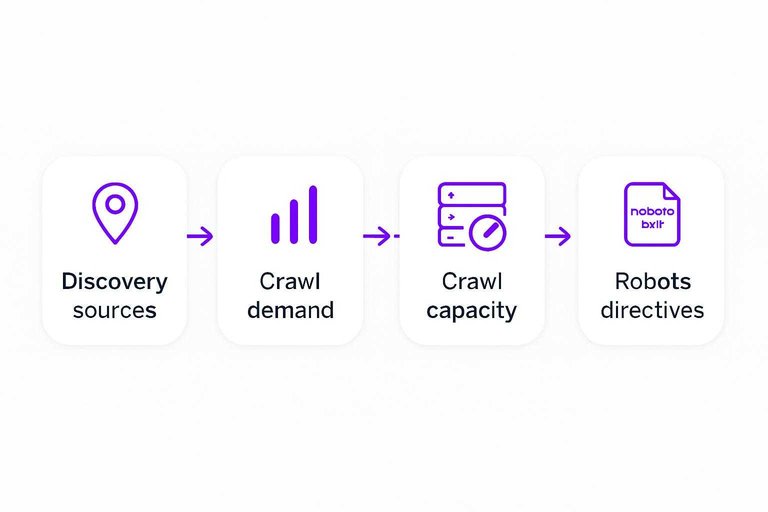
Crawling is a negotiation between what Google wants and what your host can handle. Google calls these sides crawl demand and crawl capacity.
Imagine a site that publishes frequently and earns new links. Demand rises, but if the server slows or errors, capacity shrinks.
Your fastest lever is reliability, because responsiveness sets the ceiling for crawl frequency. As you scale output—especially with daily publishing workflows—keep an eye on hosting performance, caching, and image handling so new pages don’t inadvertently reduce crawl capacity; Google’s crawl budget guidance for large sites is a useful reference for the demand/capacity model and practical optimization levers.
Robots and directives
Crawl control and index control are different systems, and they can conflict. You can let Google fetch a URL while still telling it not to show it.
- Block crawling with robots.txt when you must prevent fetching.
- Use meta robots on HTML pages to set index and follow behavior.
- Use X-Robots-Tag for non-HTML files and header-based control.
- Remember: noindex needs crawling to be seen and applied.
- Verify outcomes in URL Inspection and Page indexing reports.
Google may crawl but not index when it can fetch the page but gets a “don’t index” signal. If you’re publishing at high velocity, it’s worth standardizing these directives across templates so you don’t accidentally ship sections as noindex or blocked; SEO-oriented publishing pipelines that enforce consistent formatting and metadata can reduce those preventable mismatches.
Fetching and Rendering
Googlebot doesn’t “see” your site. It requests URLs over HTTP, interprets the response, then decides what to render and keep.
If any link in that chain changes, Search Console can show different signals for the same page.
HTTP fetch details
When Googlebot fetches a URL, the first decision is purely technical: what response came back, and what did it allow.
Tiny HTTP differences can flip a page from indexable to ignored.
A few fetch details that routinely change outcomes:
- Status codes: 200, 301, 302, 404, 410, 429, 5xx.
- Redirect behavior: chains, loops, mixed HTTP/HTTPS.
- Headers: robots tags, canonical hints, vary, caching.
- Content negotiation: language, mobile variants, compressed formats.
- Caching and freshness: ETag, Last-Modified, Cache-Control.
Treat HTTP as your contract with Googlebot. Break it, and everything upstream becomes noise.
Rendering queue
Google often indexes the raw HTML first, then revisits to render JavaScript later.
That gap is normal, and it can confuse teams.
- First wave: parse HTML and links
- Second wave: render with WRS
- JavaScript executes with limits
- Some resources time out
- Rendered text appears later
If your critical content needs rendering, you’re betting on the second wave.
Resource dependencies
Rendering depends on everything your page calls: CSS, JS, fonts, APIs, and third-party widgets.
If those calls fail or stall, Google’s rendered output changes.
Imagine a product page where the title is in HTML, but the price loads from an API.
If the API is slow, blocked, or requires cookies, Google may render without the price.
That can reduce confidence in what the page represents, even if it “works” for users.
Make the core page meaning available without fragile dependencies. Reliability becomes a ranking input by proxy.
Canonicalization and Indexing
Google can crawl a URL and still never show it in Search. Canonicalization decides which version represents a set of duplicates, then indexing decides if that canonical deserves a slot. Most frustration in Search Console lives in the gap between those two decisions.
Duplicate clustering
Google groups near-identical URLs so it can pick one primary version and ignore the rest.
- rel=canonical hints and consistency
- Redirect chains and final destinations
- Sitemap entries and lastmod patterns
- Internal links and anchor patterns
- Content similarity and template overlap
If several signals disagree, you do not have “duplicates.” You have an argument.
Index selection
After clustering, Google decides whether the canonical is worth indexing. A URL can be “Discovered” or “Crawled” and still miss the cut.
Indexing tends to favor pages that show clear intent, unique value, and low spam risk in context. Thin variations, heavy boilerplate, or pages that look like internal search results often get crawled but skipped.
Fixing crawl budget rarely helps here. You need a better page, or fewer versions.
Canonical mismatches
A mismatch happens when your declared canonical loses to stronger, conflicting signals.
- Audit every signal: canonicals, redirects, internal links, and sitemaps.
- Remove conflicts by making one version the clear destination everywhere.
- Eliminate soft redirects, like “different URL, same content” category pages.
- Normalize parameters with consistent linking, rules, and stable faceted URLs.
- Recheck URL Inspection for the chosen canonical after recrawl.
Make the preferred URL the easiest story to believe. Google usually accepts the simplest narrative.
Sitemaps and URL Submission
Sitemaps and URL Submission is how you hand Google a clean list of URLs and a fast way to troubleshoot individual pages. It helps discovery and prioritization, but it never compels indexing. Use it like an air-traffic controller: routing, signals, and alarms—not a magic “publish” button.
Sitemap processing
Google treats your sitemap as a set of hints, then cross-checks it against what it already knows.
- Fetch the sitemap and validate format.
- Expand sitemap indexes into child sitemaps.
- Extract URLs and read optional lastmod hints.
- Compare URLs against canonical signals and known duplicates.
- Record errors and ignore unreliable sitemaps.
If your sitemap disagrees with your site signals, the sitemap loses.
Inspection requests
Request indexing pushes a single URL into a higher-priority discovery path. It typically queues a recrawl, re-runs key fetch and render checks, and refreshes signals used for indexing decisions.
It can speed up crawling, but it cannot guarantee inclusion, rankings, or rich results.
Common misconceptions
These myths cause most sitemap and inspection frustration.
- A sitemap submission forces indexing.
- lastmod guarantees a recrawl.
- “Submitted” means “included.”
- Request indexing guarantees rankings.
- Fixing a sitemap fixes thin content.
Treat submissions as routing hints, then win on canonicals, content, and internal links.

Coverage and Indexing Reports
Google Search Console doesn’t report raw crawl logs. It compresses many signals into a few buckets you can act on. Those labels shift because Google’s view of a URL is a moving state, not a permanent verdict.
State machine view
Statuses are just labels on top of a handful of internal states. Map the label to the state first, then decide what to check next.
| GSC label | Likely internal state | Typical cause | First check |
|---|---|---|---|
| Discovered, not indexed | Discovered | Found URL, not fetched | Crawl budget, sitemaps |
| Crawled, not indexed | Crawled | Fetched, not kept | Content quality, duplication |
| Indexed | Indexed | In index | Confirm in URL Inspection |
| Duplicate, Google chose different canonical | Selected canonical (other) | Canonical mismatch | Canonical tags, internal links |
| Blocked by robots.txt | Blocked | Fetch disallowed | robots.txt rules |
| Server error (5xx) | Error | Unreachable or failing | Logs, uptime, headers |
| Excluded (various) | Excluded | Not eligible or de-prioritized | Noindex, redirects |
Once you see it as a state machine, the “mystery” statuses become predictable transitions.
For canonical-related labels, it helps to understand how Google groups duplicates and chooses a representative URL (see the Duplicate URL and canonical selection concept).
Validation workflow
“Validate fix” is a monitoring job, not a full-site reindex button. It checks a sample, reprocesses signals, then expands if results look consistent.
- Google selects a sample of affected URLs.
- It recrawls or reprocesses those URLs and related signals.
- It marks results as Started, then Looking good, then Passed or Failed.
- It continues spot-checking, even after a pass.
- It stops early if failures repeat in the sample.
Validation can pass while the issue persists on untested URLs, so keep auditing beyond the sample.
Debugging priorities
Triage is about removing the biggest constraints first. Start with anything that makes indexing impossible, then handle disagreements about canonicals.
Fix indexing blockers first: robots.txt blocks, noindex, auth walls, persistent 5xx, bad redirects, or unsupported status codes. Then resolve canonical conflicts by aligning canonicals, internal links, and sitemap URLs to the same preferred version. Finally, tackle “crawled/discovered, not indexed” with quality checks like duplication, thin templates, and weak internal demand—use an ultimate checklist for streamlining SEO content to standardize what you review.
Pick checks that reduce uncertainty fastest, even if they feel boring.
Links and Internal Structure
Google’s crawler moves through your site as a link graph, not a list of URLs. That graph shapes what gets discovered, which URL becomes primary, and where authority concentrates. GSC’s link reports are a simplified, delayed view of that same structure.
Internal links logic
Internal links create crawl paths, and crawl paths decide what gets attention first. Prominent links also act like votes, nudging Google toward one URL version when duplicates exist.
A few mechanics matter most:
- Prominence: Header and hub links get found earlier and revisited more.
- Path depth: The more clicks from the start set, the less reliable crawling becomes.
- Duplicate routes: Facets, parameters, and trailing slashes split signals across near-identical URLs.
- Canonical conflicts: If internal links point at non-canonicals, Google tests alternatives.
If your templates link to the “wrong” version, you’re training Google’s graph to disagree with you.
External links logic
GSC’s external link data is built for direction, not perfect accounting. It reports a sampled, consolidated view that often won’t match third-party crawlers.
- Shows a sampled set, not every known link
- Consolidates signals to canonical URLs
- Groups some duplicates and similar sources
- Updates on a different cadence than crawlers
- Reflects Google’s processing, not raw discovery
Treat the counts as a map of emphasis, not a ledger of record.
Practical link checks
Use GSC link reports to validate your architecture, not to audit every URL. You’re looking for mismatches between how you link and how Google groups pages.
- Pick a key page and confirm its canonical target is stable.
- Check internal links point directly to that canonical URL.
- Trace navigation paths to it from primary hubs and category pages.
- Compare “Top linked pages” to your intended priority set.
- Identify orphans: URLs receiving impressions with few or no internal links.
Fix the internal graph first, then worry about the counts.
Use GSC Like a Diagnostic System, Not a Dashboard
- Start with the question you’re answering (visibility drop, indexing gap, crawl waste, or link equity flow) and pick the report that matches that stage of the pipeline.
- Confirm the right property scope and access (Domain vs URL-prefix, correct protocol/subdomain) before you interpret any counts or trends.
- Work in order: Discovery/crawl signals → Fetching/rendering blockers → Canonical/index selection → Coverage/Indexing states → Performance outcomes.
- Treat URL Inspection and sitemaps as diagnostics and hints, then validate by checking patterns across reports and fixing the highest-impact, repeatable issues first.
Frequently Asked Questions
- Is Google Webmaster Console the same thing as Google Search Console in 2026?
- Yes—Google Webmaster Tools was renamed to Google Search Console (GSC). Most people still use “google webmaster console” as a legacy term, but it refers to the same product.
- Why do Google Webmaster Console numbers not match Google Analytics (GA4) traffic?
- GSC reports clicks/impressions from Google Search results, while GA4 measures sessions on your site and can be affected by consent mode, redirects, ad blockers, and attribution rules. Compare GSC “Search results” to GA4 “Organic Search” with the same date range, country, device, and landing pages to narrow the gap.
- How often does Google Webmaster Console update data, and why is there a delay?
- Most GSC reports update on a delay because data has to be processed, deduplicated, and aggregated before it’s shown in the UI. Use the URL Inspection tool for the most current page-level signals (crawl/index status), and use Performance reports for trend analysis rather than real-time monitoring.
- How do I verify and fix Core Web Vitals issues shown in Google Webmaster Console?
- Confirm the issue using PageSpeed Insights and Chrome DevTools, then prioritize fixes that reduce LCP (optimize images/server response), improve INP (reduce main-thread JS work), and prevent CLS (reserve space for media/ads). After deploying changes, use GSC’s “Validate fix” to track whether real-user (CrUX) data improves over time.
- Can I use Google Webmaster Console to track SEO content performance and decide what to publish next?
- Yes—use the Performance report to find queries/pages with high impressions but low CTR or average position, then update those pages or create supporting content targeting related long-tail queries. If you want to scale this workflow, a tool like Skribra can help generate SEO-focused drafts based on target keywords while you use GSC to validate what actually gains impressions and clicks.
Turn GSC Insights Into Rankings
Understanding the crawl-to-report pipeline is only half the job; improving Coverage, internal links, and performance metrics requires consistent, search-ready publishing.
Skribra produces daily SEO-optimized articles with WordPress publishing and built-in backlink exchange so your Google webmaster console data has fresh pages to reward—start with the 3-Day Free Trial.
Written by
Skribra
This article was crafted with AI-powered content generation. Skribra creates SEO-optimized articles that rank.
Share: